Why Your 3D Printer Nozzle Keeps Clogging (And How to Fix It Forever)
Temperature too low, heat creep, dust on filament, or retraction too high. Diagnose and fix each cause so clogs stop recurring.
Compare prices & save today
Sort by $/kg, filter by PLA, PETG, ABS. Real prices from Amazon, Ebay & AliExpress and manufacturer stores—find the cheapest filament in seconds.
Compare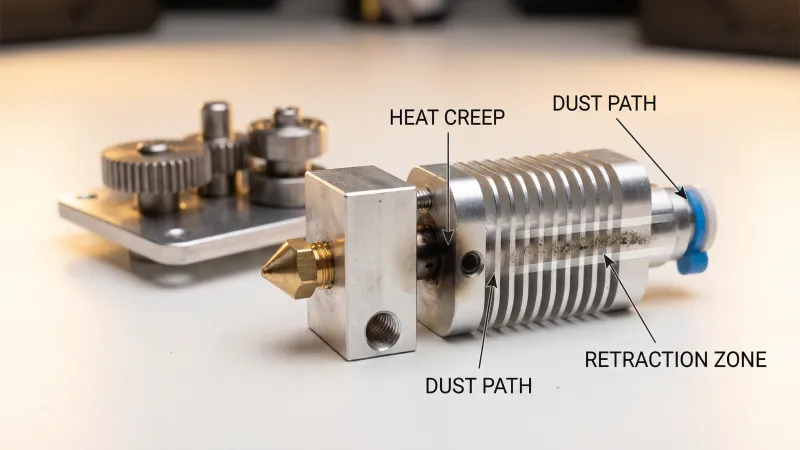
Your extruder clicks, nothing comes out, and the nozzle looks fine. After testing dozens of printers and hundreds of spools, we found that recurring clogs almost always trace back to four causes: temperature too low, heat creep, dust on filament, or retraction too aggressive.
This guide explains why your 3D printer nozzle keeps clogging and how to fix each cause permanently. You will learn to diagnose the extruder clicking and no filament coming out symptom, implement preventive measures, and choose upgrades that reduce clogs for good. For cleaning an already clogged nozzle, see our nozzle unclog guide.
Why Does My 3D Printer Keep Clogging?
Recurring nozzle clogs come from four root causes. Each has a different fix. If you treat every clog the same way, you will keep seeing the problem.
The extruder clicking and no filament coming out symptom means the extruder gear is trying to push, but something blocks the flow. Either the melt zone is too cold, heat has crept into the cold zone, debris has accumulated in the path, or retraction has pulled molten plastic into a region where it solidifies and jams.
Cause 1: Temperature Too Low
PLA prints best between 200–220°C depending on brand. PETG needs 225–245°C. Printing below the material's flow temperature leaves semi-solid plastic in the nozzle. It builds up, restricts flow, and eventually jams.
Cheap thermistors read 5–10°C low. If your slicer says 210°C but the actual melt zone is 200°C, PLA will underflow. We run a pid autotune every few months and verify with a thermocouple. The fix: bump nozzle temp 5–10°C or calibrate your hotend. For material choices, our PLA vs PETG guide covers temperature ranges.
Cause 2: Heat Creep (Heat Rising Where It Shouldn't)
Heat creep is when heat from the block travels up into the cold end of the hotend. The filament is meant to stay solid above the melt zone. If that region gets too hot, plastic softens before it reaches the nozzle. It expands, sticks to the PTFE liner or heat break, and jams.
A weak or dying hotend fan is the usual cause. The 40×10mm fan on most Creality-style hotends runs continuously. When it fails or slows, the heat sink cannot dissipate heat. PLA at 60°C in the cold zone behaves like chewing gum. Fix: replace the fan. Noctua 40mm fans run quieter and last longer than stock. Check your printer's voltage (12V or 24V) before buying.
Quieter and more reliable than stock 40mm hotend fans. The 24V PWM version matches most Creality printers. Check your printer specs—12V and 24V models exist. Replacing a noisy or failing fan often eliminates heat creep clogs entirely.
Amazon, Noctua 40mm Hotend Fan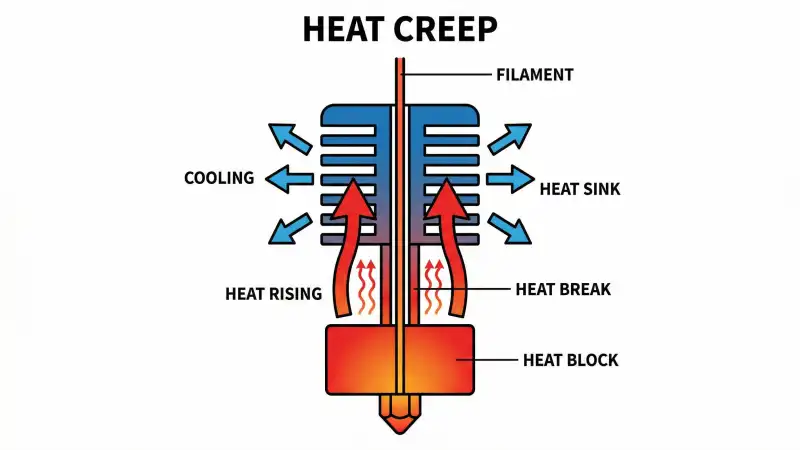
Cause 3: Dust on Filament
Dust and debris on the spool enter the hotend with the filament. Over time, they accumulate in the nozzle bore or at the PTFE–nozzle interface. A single particle rarely jams; hundreds do.
Open spools in a workshop collect dust. Static on PETG attracts it. The fix: run filament through a dust filter before it enters the extruder. Filters cost a few dollars and last for months. They catch particles that would otherwise reach the nozzle. For storage that keeps spools cleaner, see our filament storage guide.
Universal filament cleaners that remove dust and static before filament enters the extruder. 4-pack fits most Bowden and direct-drive setups. Install between spool and feed, replace when dirty. Simple upgrade that prevents many clogs.
Amazon, 4-Pack Filament Dust FilterCause 4: Retraction Too High
Retraction pulls filament backward to reduce stringing. Too much retraction pulls molten plastic from the nozzle into the cold zone. It solidifies there, then acts as a plug on the next push.
Bowden printers need more retraction (4–7mm) than direct-drive (0.5–2mm). If you crank retraction to fix stringing without testing, you increase clog risk. Start low and increase in 0.5mm steps. Also ensure the bowden tube is seated firmly against the nozzle—a gap creates a melt pool that jams.
Capricorn PTFE tubing has tighter tolerances and better heat resistance than cheap tubing. It reduces friction, so you can often run lower retraction. Tubes degrade over time; replacing with Capricorn improves reliability.
Premium PTFE with tighter inner diameter and higher heat resistance than stock tubing. Reduces friction so you need less retraction. Includes cutter and often fittings. Compatible with Ender 3, CR-10, and most Bowden setups.
Amazon, Capricorn PTFE Tubing Kit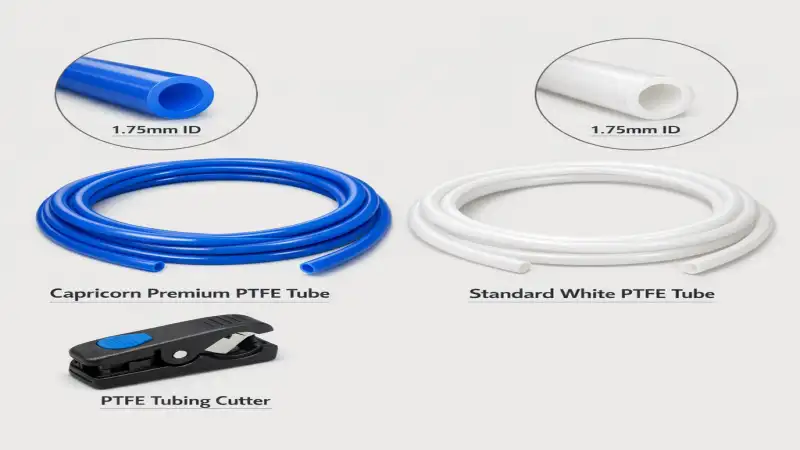
Quick Fix Summary
| Symptom / Cause | Fix |
|---|---|
| Temperature too low | Raise nozzle 5–10°C, calibrate thermistor |
| Heat creep | Replace hotend fan (Noctua 40mm) |
| Dust on filament | Install filament dust filter |
| Retraction too high | Lower retraction 0.5mm, ensure tube seated, upgrade to Capricorn PTFE |
Troubleshooting
- Extruder clicking, no filament coming out
- Blockage in nozzle or upstream. Try cold pull first. If nothing extrudes, check for heat creep (fan), dust (filter), or retraction (lower it). See our unclog guide for step-by-step.
- Clog clears then returns after a few prints
- Likely dust or heat creep. Add a filter and inspect the hotend fan. Replace both if old.
- Clogs only with certain filament
- Temperature or retraction. Some brands need higher temp. Try +5°C. Wet filament can also cause jams—dry 4–6 hours at 45–50°C.
- Clogs after switching materials
- Incomplete purge. Run 50–100mm of extrusion at new material temp before printing. Old plastic left in nozzle can carbonize and block.
FAQ
- Why does my 3D printer keep clogging?
- Short answer: Usually temperature too low, heat creep (weak fan), dust on filament, or retraction too high. Fix each cause: raise temp, replace hotend fan, add filament filter, lower retraction and ensure bowden tube is seated.
- Why is my extruder clicking and no filament coming out?
- The extruder gear is pushing but something blocks flow. A nozzle clog, heat creep, or jam in the bowden tube. Check the hotend fan runs, try a cold pull, and lower retraction if it is above 6mm for Bowden.
- What is heat creep in 3D printing?
- Heat from the hotend block traveling up into the cold zone. The filament should stay solid until the melt zone. If the cold zone gets too hot, plastic softens early, expands, and jams. A failing hotend fan causes it.
- Does dust cause nozzle clogs?
- Yes. Dust on filament accumulates in the nozzle and at the PTFE–nozzle interface. Over many hours, it restricts flow and causes clogs. A filament dust filter prevents this.
- Can retraction cause clogs?
- Yes. Too much retraction pulls molten plastic into the cold zone. It solidifies and blocks the next push. Bowden: 4–7mm. Direct drive: 0.5–2mm. Start low and increase gradually.
- Is Capricorn tubing worth it?
- Yes for Bowden printers. Tighter tolerances reduce friction, so you need less retraction. Better heat resistance slows degradation. Reduces clogs and stringing when set up correctly.
- How do I know if my hotend fan is failing?
- Listen for rattling, slowing, or no spinning at all. Touch the heat sink after a print—if it is too hot to hold, the fan is not cooling enough. Replace with a quality 40mm fan.
- What temperature should I use for PLA?
- 200–220°C depending on brand. Start at 210°C. If under-extruding or clogging, try 215–220°C. Cheap thermistors can read 5–10°C low.
- Should I use a filament filter?
- Yes if you have recurring clogs or keep spools in a dusty area. Filters cost a few dollars and prevent particles from reaching the nozzle. Replace when visibly dirty.
Fix Clogs Permanently
Recurring nozzle clogs are preventable. Temperature, heat creep, dust, and retraction cause most of them. Raise temps if under-extruding, replace a weak hotend fan, add a filament filter, and dial retraction down. Upgrade to Capricorn PTFE and a quality fan when upgrades make sense.
Compare filament prices on our main tool. For cleaning a clogged nozzle, see How to Unclog a 3D Printer Nozzle. For material choices, PLA vs PETG and strongest filaments.
Stop overpaying for 3D filament!
Compare brands and save today. Our tool shows real prices from Amazon, Ebay, AliExpress and manufacturer stores.
Compare brands & save today